
Installing GCC from source
In case your system packages provide a GCC version that is too old (< version 11) you can install a more modern GCC version from source. This guide is for linux.
After checking the prerequisites you can download the source code from a mirror site, like this one. You can also check the gpg signature. To this end you first need to have the keyring imported:
curl http://ftp.gnu.org/gnu/gnu-keyring.gpg -O
gpg --import gnu-keyring.gpg
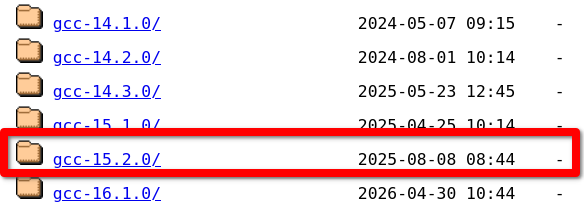
Select a recent version, download and unzip it. In this guide however we will use gcc-15.2.0.
tar -xf gcc-15.2.0.tar.gz
cd gcc-15.2.0
Next we need to download the prerequisites by invoking an automated download script:
./contrib/download_prerequisitesAfter this is done we can configure the build:
./configureRun configure without multilib support ./configure --disable-multilib if you get the following error:
configure: error: I suspect your system does not have 32-bit development libraries (libc and headers). If you have them, rerun configure with --enable-multilib. If you do not have them, and want to build a 64-bit-only compiler, rerun configure with --disable-multilib.After successful configuration you can compile gcc
make -j16Above, the -j16 flags specifies that 16 jobs can run in parallel. Adapt this number to your system to maximize the parallelism. The build takes a long time.
After the build has succeeded you can install gcc as a privileged user:
sudo make installYou can test whether your gcc compiler now has the newly installed version:
$ gcc --version
gcc (GCC) 15.2.0
However during sudo make install you will see a hint
Libraries have been installed in:
   /usr/local/lib/../lib64

If you ever happen to want to link against installed libraries
in a given directory, LIBDIR, you must either use libtool, and
specify the full pathname of the library, or use the `-LLIBDIR'
flag during linking and do at least one of the following:
   - add LIBDIR to the `LD_LIBRARY_PATH' environment variable
     during execution
   - add LIBDIR to the `LD_RUN_PATH' environment variable
     during linking
   - use the `-Wl,-rpath -Wl,LIBDIR' linker flag
   - have your system administrator add LIBDIR to `/etc/ld.so.conf'

See any operating system documentation about shared libraries for
more information, such as the ld(1) and ld.so(8) manual pages.
On most systems the library path /usr/local/lib64 is not included in the system library search path by default. As a result your compiled programs cannot be executed (but they will compile using the new compiler). One way to add the library path using ldconfig. To do this create a file /etc/ld.so.conf.d/local-lib64.conf with the content
/usr/local/lib64Then run sudo ldconfig. This has to be done only if your system does not contain the path /usr/local/lib64 yet.
At this point you should be able to build and run Warthog as described here. Note that after compiler upgrade, if you already generated the build directory, you should delete it and regenerate it using meson setup build.